How To Fix Smart Mattress Climate Zone Blower Whining?
That annoying whine from your smart mattress is hard to ignore. You lie down to relax, and instead you hear a strange sound coming from the blower.
The good news? This is a common problem with a simple fix.
Most smart mattresses use a blower motor to control climate zones. This motor pushes air through hoses inside your mattress. Over time, these hoses can loosen, twist, or disconnect.
When that happens, the blower motor works harder than it should. This extra strain often causes that whining noise you keep hearing at night.
In a Nutshell
- Check your hoses first. Unzip the cover and look for kinks or twists in the internal air hoses. This is the top cause of blower whine.
- Secure loose connections. Make sure every hose is firmly attached to its air chamber. A loose fit forces the blower to work harder.
- Power cycle the bed. Unplug it for 60 seconds, then plug it back in. This resets the system after you fix any hose issues.
- Do things in order. Always inspect hoses before you power cycle. Skipping this step is a common mistake.
- Don’t ignore the noise. A whining blower is not normal operation. It usually points to an airflow problem inside the mattress.
- Most fixes are simple. You can solve this issue yourself in a few minutes. No tools or technical skills needed.
Understanding the Climate Zone Blower System
A smart mattress climate zone blower system works by pushing air through internal chambers to heat or cool different zones of your bed. The blower motor sits inside your mattress base and connects to a series of air hoses. These hoses run throughout the mattress structure to distribute temperature controlled air where you need it.
The system uses sensors to detect your desired temperature settings. Once you adjust the climate controls, the blower motor activates and pushes air through the hose network. This air fills separate chambers under different parts of your mattress, creating zones you can control independently.
Most smart mattresses have multiple air chambers. Your head zone might have its own chamber. Your torso zone has another. Your leg zone has a third. This design lets you warm your feet while cooling your upper body, all at the same time.
The blower motor itself is relatively simple. It’s an electric fan that runs on low power. When working properly, you barely hear it operating. The motor only needs to run periodically to maintain your desired temperature throughout the night.
Air hoses connect everything together inside your mattress. These hoses are flexible tubes that route air from the blower motor to each climate zone chamber. They also have return paths that bring air back to the motor. The entire system is sealed, so air circulates continuously without escaping.
Understanding this layout helps you troubleshoot problems. When the blower whines, something is restricting airflow or creating pressure buildup. The motor then works harder than normal, causing that annoying sound. Knowing where the hoses run and how they connect makes it easier to spot what’s wrong.
The good news is that most issues stem from simple mechanical problems, not electrical failures. A kinked hose or loose connection can trigger that whining noise. Once you fix the airflow issue, your blower returns to quiet operation.
Why the Blower Whines: Common Causes Explained
A whining blower happens for specific reasons. Understanding these causes helps you fix the problem quickly.
Loose or kinked hoses are the most common culprit. Your smart mattress has internal air tubes that run through the mattress. Over time, these hoses can shift inside the cover. When a hose gets twisted or bent, air cannot flow smoothly. The blower motor then works harder to push air through the obstruction. This extra strain creates that high pitched whine you hear.
Disconnected air chamber connections cause similar issues. Each climate zone has an air chamber. Hoses attach to these chambers with connectors. If a connection loosens or separates, the blower loses pressure. The motor compensates by running at higher speed. This produces the whining noise.
Blower motor strain from airflow blockage is the underlying problem in both cases. Think of it like breathing through a straw. When the straw gets pinched, you have to work harder. Your blower motor does the same thing. It pushes harder when air cannot move freely.
Normal wear and tear can loosen connections over months of use. The mattress shifts slightly as you sleep. Hoses naturally move around inside the cover. Connectors can gradually come loose from vibration and movement.
The good news? These are mechanical problems, not electrical failures. You don’t need replacement parts in most cases. Simple inspection and reconnection solve the issue.
Temperature fluctuations can also play a role. When your bedroom gets cold, plastic connectors contract slightly. This can create tiny gaps in connections. When the room warms up, they expand again. This repeated expansion and contraction eventually loosens connections.
Start by understanding that whining means something is blocking airflow. Your blower is telling you it’s working too hard. The fix involves finding what’s blocking the air and removing that obstruction. Most people solve this problem in under ten minutes.
Step-by-Step: Inspecting Internal Air Hoses
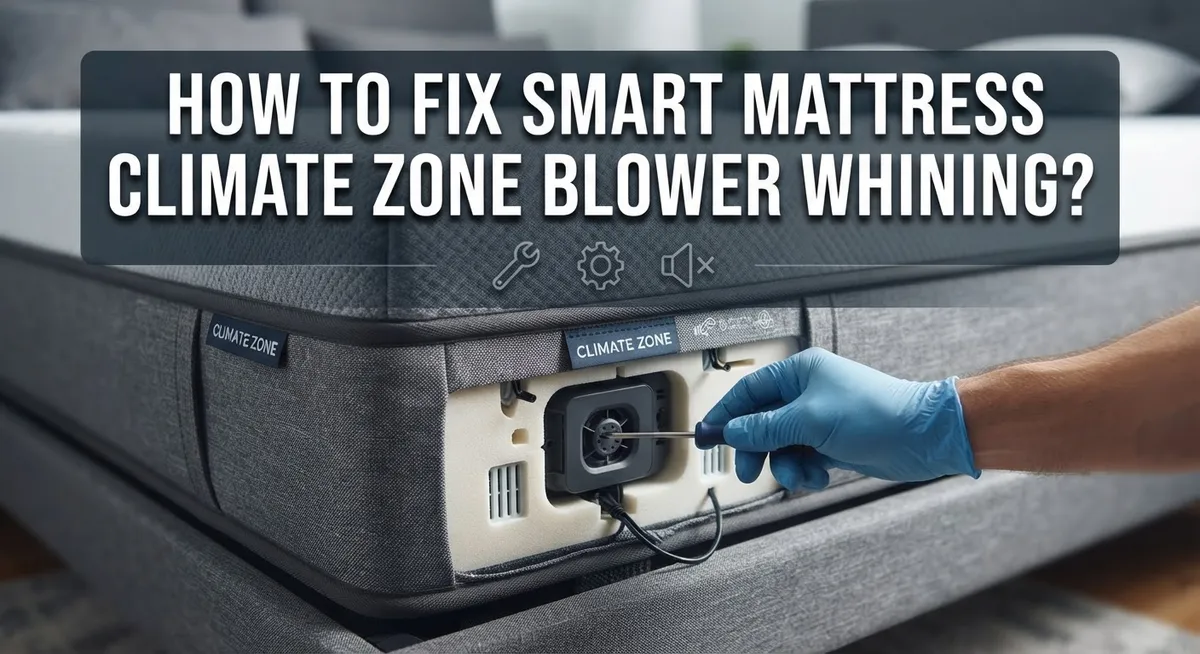
Start by unzipping your mattress cover carefully. You need access to the internal hoses to inspect them properly. Set the cover aside where it won’t get dirty or damaged.
Look at all the air hoses running inside your mattress. These tubes carry air from the blower to different climate zones. Trace each hose from the blower motor to the air chambers to spot any problems.
Check for kinks in the hoses. A bent or twisted hose restricts airflow and forces the blower to work harder. This extra strain creates that whining sound you hear. Gently straighten any kinked sections by hand. Be careful not to pinch or damage the hose material.
Inspect every connection point where hoses attach to air chambers. Loose connections are extremely common and cause most blower whining issues. Look for hoses that have partially pulled away from their attachment points. You should see them firmly seated in place.
Feel around each connection to confirm it’s secure. Push gently on the hose ends to make sure they don’t slide or move. If a connection feels loose, you can usually push it back on until it clicks or seats fully. Some systems use clips or bands to hold hoses in place. Check that these fasteners are tight.
Look for any visible cracks, holes, or damage in the hose material itself. Even tiny punctures cause air leaks and force the blower to compensate. Damaged hoses may need replacement, but most whining comes from loose connections rather than damaged tubes.
Take your time during this inspection. Don’t rush through checking each connection. Most whining problems resolve once you secure loose hoses and straighten kinked sections. If hoses look fine after inspection, you can move to the next troubleshooting step.
Step-by-Step: Power Cycling Your Smart Mattress
Power cycling your smart mattress is a simple electrical reset that often stops the whining noise. This process clears temporary glitches in the blower motor control system.
Start by locating the power cord on your mattress base or control unit. Most smart mattresses plug into a standard wall outlet. Some models have a dedicated power button you should press first to shut down the system completely.
Unplug the mattress from the wall outlet. Wait a full 60 seconds before reconnecting. This waiting period is important because it allows the internal circuits to fully discharge and reset. Don’t rush this step. Set a timer if needed to ensure you wait the complete minute.
After 60 seconds have passed, plug the mattress back into the outlet. If your model has a power button, press it to restart the system. You should hear the blower motor activate as the system boots up. Listen carefully during this startup phase.
Let the mattress run for several minutes after power cycling. The blower should cycle through its normal operation as the system initializes. Pay attention to whether the whining noise returns or if it sounds quieter than before.
Check your temperature settings on the control panel or app. Make sure your desired zone temperature is set correctly. Sometimes power cycling resets your preferences to default settings.
If the whining continues after power cycling, the issue likely stems from the mechanical problems we discussed earlier, not an electrical glitch. This means you should go back and double check those air hose connections and inspect for kinks.
Power cycling is always worth trying first because it takes only a few minutes and solves many problems. However, remember that this step works best when combined with proper hose inspection. Most successful fixes involve both checking the physical components and performing a clean electrical reset.
Tips for Preventing Future Blower Noise
Preventing future blower noise requires simple maintenance habits that keep your smart mattress running smoothly. The best approach is to check your air hoses every few months, even when everything sounds normal.
Inspect hoses regularly before problems start. Set a reminder to examine all internal hoses twice a year. Look for kinks, twists, or signs of wear. Catch problems early before they cause whining sounds. This takes only 10 minutes and saves you from frustration later.
Keep your mattress base level and stable. An uneven surface puts stress on hoses and connections over time. Make sure the base sits flat on your floor. Check that all legs or feet make firm contact with the ground. An unstable mattress works harder and wears out faster.
Avoid placing heavy objects on top of your mattress when it’s not in use. Extra weight can compress hoses and damage internal components. This includes sitting on the edge repeatedly or storing items on the surface.
Maintain proper ventilation around your mattress base. The blower motor needs airflow to function without strain. Don’t push your bed directly against walls or into tight corners. Leave at least 6 inches of space on all sides for air circulation.
Check all visible connections where hoses attach to the mattress. Tighten any loose connections you find. Vibration from normal use can gradually loosen these connections over months.
Keep your temperature settings reasonable. Extreme settings force the blower to work harder. Use moderate settings that keep your bed comfortable without pushing the system to its limits.
Store your mattress properly if you move or need to take it apart. When reassembling, reconnect every hose securely. Double check each connection point before powering the system back on.
These simple prevention steps reduce noise problems and extend your mattress lifespan significantly.
Mistakes to Avoid When Troubleshooting
When troubleshooting your smart mattress climate zone blower, several common mistakes can delay your solution or make the problem worse.
Don’t skip the hose inspection step. Many people assume the whining comes from an electrical issue and immediately power cycle the mattress. This wastes time because most whining actually comes from mechanical problems like kinked hoses or loose connections. Always check the hoses first before attempting any electrical resets.
Avoid overlooking loose connections at attachment points. The hoses connect to air chambers at multiple spots inside your mattress. A connection that looks secure might actually be slightly loose. Push gently on each connection point to confirm it sits fully in place. Even a partially disconnected hose creates airflow problems that cause the blower to strain and whine.
Don’t assume the whining is normal operation. Some people think their mattress is supposed to make noise during temperature adjustments. Normal operation should be quiet or produce only soft humming sounds. Persistent whining indicates an actual problem that needs fixing.
Avoid rushing through your inspection. Take your time examining every inch of visible hose. Kinks can be subtle and easy to miss if you’re moving quickly. Poor lighting inside the mattress cover makes finding problems harder, so consider using a flashlight.
Don’t ignore small cracks or holes in the hose material itself. These damage spots might seem minor, but they allow air to escape. This forces your blower motor to work harder, creating strain and noise.
Avoid disconnecting hoses unnecessarily during your inspection. Only disconnect them if you absolutely need to straighten a kink or reposition them. Unnecessary disconnections increase your chances of creating new connection problems.
Finally, don’t attempt complex repairs beyond basic hose inspection and connection checks. If problems persist after these steps, your mattress likely needs professional service rather than further DIY troubleshooting.
When the Whining Persists: Advanced Troubleshooting
When the whining persists after basic troubleshooting, you need to dig deeper into the mechanical systems. The issue usually lives in places you haven’t checked yet. Start by removing your mattress cover completely. This gives you full access to all internal hoses and connections that the basic inspection missed.
Look for hoses that twist or bend at sharp angles inside the mattress chamber. Even small kinks restrict airflow and force your blower motor to work harder, creating that persistent whine. Gently straighten any bent sections. Pay special attention to hoses near the edges and corners where they often get compressed or folded during normal use.
Next, trace every single connection point from the blower unit to each air chamber. Connections can loosen over time from vibration and temperature changes. Push each connection firmly onto its port until you hear or feel a click. Sometimes a connection looks secure but isn’t fully seated. Reseating it completely often solves the whining problem.
Check for small cracks or punctures in the hose material itself. Run your fingers along the entire length of visible tubing. Even tiny holes create air leaks that strain your blower motor. If you find damage, that hose needs replacement.
Inspect where hoses attach to the mattress base or control unit. These connection points experience the most stress and frequently loosen first. Tighten any loose fittings by hand or with the appropriate tool if needed.
After completing these advanced checks, power cycle your mattress again. This reset allows the system to recalibrate after your adjustments. Let it run for at least five minutes before assessing the noise level. If whining continues after these thorough mechanical checks, contact the manufacturer’s support team for potential motor replacement or professional service options.
Final Thoughts
A whining blower does not mean your smart mattress is broken. Most of the time, it just needs a little attention.
Hose inspection comes first. Check every connection before you touch any power buttons. This simple step solves most whining problems without extra steps.
Power cycling helps too. But it works best after you fix any hose issues. Doing both together gives you the best results.
Your mattress deserves regular checkups. Just like any other appliance, it needs occasional care. A few minutes each month keeps the blower running quietly.
Remember that kinks and loose connections cause most of the noise you hear. These are easy fixes you can do yourself. You do not need special tools or technical knowledge.
Take your time when you inspect the hoses. Rushing through this step often means missing the actual problem. Slow and careful work pays off here.
If basic fixes do not work, move to advanced troubleshooting. Check deeper connections and look for small cracks. This extra effort usually finds the hidden cause.
Patience matters throughout this whole process. Some fixes work right away. Others take a bit more digging to solve completely.
Keep in mind that prevention beats repair every time. Regular hose checks and proper mattress care stop most whining before it starts. This saves you time and frustration later.
Your smart mattress should give you quiet, comfortable sleep. When the blower whines, it is simply asking for a quick check. Listen to that signal and act on it early.
With the right approach, you can fix this problem confidently. Start with hoses, then move to connections, and finish with a power cycle if needed. This order gives you the fastest path to silence.
A quiet mattress means a better night’s rest. Follow these steps, and your climate control system will run smoothly again.
Frequently Asked Questions
Why is my smart mattress blower making a whining sound?
The whining noise typically comes from your blower motor working harder than it should. This happens when air cannot flow freely through the hoses. Kinks, twists, and loose connections block the airflow path. Your blower strains to push air through these obstacles, creating that high pitched sound you hear.
Should I unplug my mattress right away?
Not immediately. Many people power cycle first, but that’s actually the wrong approach. Start by inspecting your hoses instead. Look for kinks, bends, and loose connections at attachment points. Straighten any twisted sections you find. Secure any connections that have come loose. Only power cycle after you complete the hose inspection.
How do I inspect the hoses properly?
Unzip your mattress cover carefully. Trace each hose from the blower unit to every air chamber. Look for sharp bends, kinks, and twists along the entire length. Check where hoses connect to the mattress base and control unit. Feel for small cracks or holes in the material. Take your time with this step. Most whining issues resolve once you fix loose or kinked hoses.
What if the whining continues after my inspection?
Power cycle your mattress by unplugging it for 60 seconds, then reconnecting it. This resets the blower motor. If whining persists, check your hose connections one more time. Sometimes connections loosen again during normal use. Verify every attachment point feels secure and tight.
Is a whining blower a sign my mattress is broken?
No. Your mattress is not broken. The whining simply means your blower is working inefficiently due to airflow problems. These issues are fixable through basic inspection and maintenance.

Hi, I’m Lola Griffin 👩💻, the voice and creator behind ResizerBox. I’m a passionate tech enthusiast who loves exploring the latest gadgets, smart devices, and trending Amazon electronics. Through my reviews, I share honest insights, real-world testing experiences, and practical buying advice to help readers make confident tech choices.